

An SEO audit is a systematic review of a website’s technical health, search visibility, content, and links. To conduct an SEO audit, establish a performance baseline, check crawling and indexing, review technical and on-page issues, evaluate content and links, and then prioritize verified findings by business impact, effort, and risk. Most audit tools will hand you a long list of warnings. The harder and more valuable skill is deciding which few issues deserve attention first.
This guide walks through a repeatable audit process and a simple prioritization method you can use on your own site. It is written for business owners, marketing managers, and in-house SEO specialists who need a clear plan, not a list of every possible check. If you would rather hand the work to a specialist, our SEO services page explains what a full engagement includes.
What Is an SEO Audit?
An SEO audit is a structured assessment of how well a website is set up to be discovered, understood, and ranked in search engines, and whether it serves visitors well once they arrive. A full audit covers several areas: whether search engines can crawl and index important pages, whether technical and on-page elements are sound, whether content matches search intent, how internal and external links support the site, and how the site performs for users.
An audit is a point-in-time review. Ongoing monitoring is different. Monitoring watches for changes continuously, such as sudden drops in indexed pages or new crawl errors, while an audit looks at the full picture to decide what to change. Audit findings often become the starting plan for a longer professional SEO campaign, where fixes are tracked and measured over several months.
How to Conduct an SEO Audit Step by Step
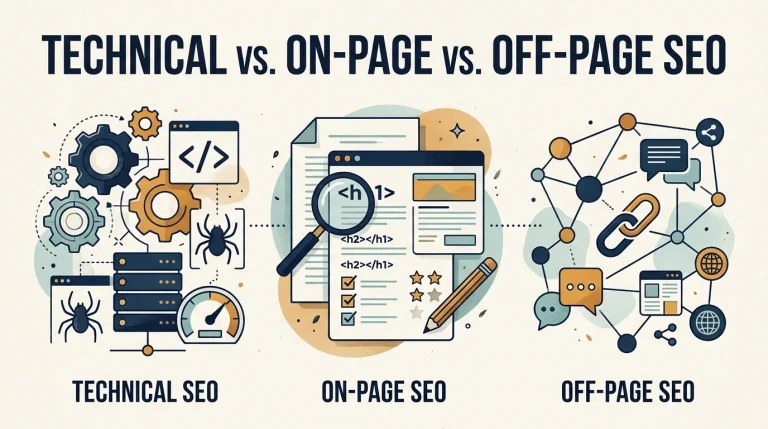
Before working through the steps, it helps to separate three areas that audits often blur together. Technical SEO vs. on-page SEO vs. off-page SEO is a useful comparison: technical work concerns how the site is built and served, on-page work concerns the content and markup of each page, and off-page work concerns signals from outside the site, mainly links. A good audit reviews all three, but it assigns each finding to the right area so that the right person fixes it.
1. Set goals and a performance baseline
Before you open a crawler, define what the site is supposed to do. A lead-generation site might measure form submissions from organic visits. An ecommerce site might focus on product page visibility and revenue from organic sessions.
Record your starting point in Google Search Console and Google Analytics: total clicks and impressions, indexed page counts, organic landing-page engagement, and conversions where tracking exists. Without a baseline, you cannot show whether a fix worked.
2. Check crawling and indexing
Crawling and indexing come first because a page that search engines cannot find or store cannot rank. Use the Page indexing report and the URL Inspection tool in Google Search Console to see which important URLs are indexed and why others are excluded.
Review three common controls:
- Robots.txt controls whether crawlers may fetch a URL. It is not a reliable way to keep a page out of search results.
- Noindex directives tell search engines not to index a page. Google’s documentation distinguishes these controls, so confirm which one you are actually relying on.
- Canonical tags signal the preferred version of a page. Google may choose a different canonical URL, so check canonical signals together rather than assuming one tag settles the question.
A crawler such as Screaming Frog SEO Spider can help you list status codes, redirects, robots directives, and canonicals across a large site.
3. Audit technical SEO and site architecture
Look at the structure that connects your pages: XML sitemaps, internal links, redirect chains, broken links, and mobile rendering. A technical SEO audit should confirm that important pages are reachable through crawlable links, not only through a sitemap or a search box.
Performance belongs here too. Google’s Core Web Vitals measure loading (Largest Contentful Paint), responsiveness (Interaction to Next Paint), and visual stability (Cumulative Layout Shift). Google’s guidance sets “good” thresholds at 2.5 seconds or less for LCP, 200 milliseconds or less for INP, and 0.1 or less for CLS, measured at the 75th percentile of page loads. Use field data where it is available, and treat lab results as diagnostic tools rather than the final verdict.
4. Review on-page elements
Check titles, meta descriptions, headings, image alt text, and structured data on key templates and pages. For a deeper look at on-page work, see our content optimization guide. Focus on patterns. A missing meta description on one blog post matters far less than a template that generates the same title for hundreds of product pages.
Structured data is worth checking for accuracy and consistency with visible content. Valid markup does not guarantee rich results, and a structured-data warning does not automatically mean a page has a ranking problem.
5. Evaluate content quality and search intent
For each important page, ask whether it answers the question the searcher had. Compare pages that target similar queries to identify duplication, thin content, or keyword cannibalization, where several URLs compete for the same topic. Check whether the page offers something specific, such as examples, steps, or evidence, rather than a generic summary.
Google’s guidance favors helpful, original content written for people. An audit should identify where content is unclear, outdated, or missing a useful answer.
6. Examine internal links and backlinks
Internal links show search engines which pages matter. Identify important pages that receive few internal links, and look for orphaned URLs. For related analytics setup, see our analytics setup resources. Review your backlink profile with a tool such as Ahrefs or Semrush to spot broken external links and unusual patterns, but treat third-party authority metrics as estimates rather than verified measures of search performance.
7. Assess performance against your baseline
Compare current data with your baseline. Look at trends in organic clicks, impressions, indexed pages, and landing-page conversions. Segment by page type, device, and country where your data allows, so that a problem in one template does not get hidden inside a site-wide average.
How to Prioritize SEO Audit Fixes by Impact and Effort
A typical audit can produce hundreds of warnings. Fixing them in the order the tool lists them is rarely the best use of time. A tool warning is a signal to investigate, not proof of a ranking problem.
This guide uses a five-step method called VITAL. It is a practical framework proposed for this article, not an industry standard.
- Verify: Confirm that the issue is real. Check the live page, the rendered HTML, and the data in Search Console before deciding anything.
- Impact: Estimate how much the issue could affect visibility, traffic, or business outcomes.
- Time and effort: Estimate the work required, including development time, cost, and risk.
- Dependencies: Identify prerequisite fixes, such as a blocked template that must be repaired before individual page changes make sense.
- Learn from results: Define how you will know the fix worked, and measure the outcome.
A simple scoring model
Rate each candidate fix from 1 to 5 on four dimensions:
- Impact (I): How much could the fix improve meaningful visibility or business outcomes?
- Confidence (C): How strong is the evidence that the issue is real and consequential?
- Scope (S): How many important pages or templates are affected?
- Effort (E): How much time or cost does the fix require?
You can combine these into a priority score:
Priority Score = (I × C × S) ÷ E
This is a triage aid that structures team decisions. It is not a Google ranking formula and does not predict SEO gains. Use judgment for urgent risks and prerequisite tasks, which may need to move to the top regardless of score.
A worked example
The table below uses illustrative scores, not measurements from a real website.
| Finding | Impact | Confidence | Scope | Effort | Score |
| Accidental noindex on key service pages | 5 | 5 | 4 | 2 | 50 |
| Weak internal links to an important service page | 4 | 4 | 3 | 2 | 24 |
| Missing alt text on some decorative images | 1 | 4 | 2 | 2 | 4 |
The noindex issue ranks first, but only after verification. Confirm the directive is actually present, and confirm that those pages are meant to appear in search. If the noindex was added intentionally, the top score is misleading.
The example also shows why counting warnings is the wrong measure. A few high-impact problems on important pages usually matter more than dozens of minor ones spread across low-value URLs.
The SEO Audit Tools You Need
You do not need an expensive stack to begin. The right tool depends on the task.
- Google Search Console (free): Indexing status, search performance, URL Inspection, and Core Web Vitals reports. This is the most important free source for understanding how Google sees your site.
- Google Analytics (free): Engagement and conversion data for organic landing pages.
- PageSpeed Insights (free): Field and lab performance data, with diagnostics for individual URLs.
- Screaming Frog SEO Spider (free for small crawls, paid licence for larger sites): Crawling, status codes, metadata, canonicals, and links at scale.
- Semrush or Ahrefs (paid): Site audits, backlink analysis, and competitive research. These are most useful when you need broader datasets than Search Console provides.
Free tools can support a useful initial audit, particularly for a small site. Paid crawlers and backlink tools become more valuable as the site grows or as the analysis requires competitor and link data.
How to Turn SEO Audit Findings Into an Action Plan
Convert prioritized findings into a task list with clear fields:
- Issue and evidence, including URLs and screenshots or exports
- Affected pages or templates
- Priority score and reason
- Estimated effort
- Owner
- Dependencies
- Acceptance test, the specific condition that proves the fix is complete
- Post-fix result, filled in after verification
Define acceptance tests before work begins. For example, “The service page returns a 200 status code, is not blocked by robots.txt or noindex, and appears in the Page indexing report within the expected period.” Specific tests prevent a fix from being marked complete when it is only partly done.
Schedule rechecks. Some changes, such as indexing updates or Core Web Vitals field data, take time to appear.
How to Measure SEO Audit Results
Track the same metrics you recorded at baseline. Useful measures include indexed pages for priority templates, organic clicks and impressions for affected pages, rankings for a defined set of target queries where you have reliable tracking, and conversions from organic landing pages.
Allow time for results to appear, and account for other changes. A seasonal dip, a site redesign, or a new competitor can influence the numbers. Record what else changed during the test window so the results can be interpreted honestly.
SEO Audit Checklist and Common Questions
Use this condensed checklist as a starting point:
- Baseline recorded in Search Console and Analytics
- Important pages indexed and no important pages accidentally blocked or noindexed
- Canonical signals consistent for key URLs
- XML sitemap includes intended pages and excludes unwanted ones
- Broken internal links and redirect chains identified
- Core Web Vitals reviewed using field data where available
- Titles, headings, and alt text reviewed on priority templates
- Content reviewed for search intent and duplication
- Internal links support priority pages
- Findings scored, assigned, and tracked with acceptance tests
How often should you conduct an SEO audit?
Monitor major technical errors and traffic changes continuously, and run a full audit periodically. Large ecommerce sites, frequent publishers, and sites undergoing migrations or redesigns may need more frequent reviews.
How long does an SEO audit take?
It depends on site size, complexity, and available data. A small site may need a few hours for an initial review, while a large or complex website can take days or longer. Treat these as planning estimates.
What should you fix first?
Start with problems that stop important pages from being crawled, indexed, or served correctly. Next, address broken or misdirected high-value pages and template-level errors. Validate each finding before making changes.
Do you need to fix every warning?
No. Fix verified issues that affect important pages or business outcomes, and deprioritize low-impact warnings.
Conclusion
A useful SEO audit ends with a short list of verified, prioritized actions, not a long list of warnings. Establish a baseline, check crawling and indexing first, review technical, on-page, content, and link factors, and then score each finding by impact, confidence, scope, and effort. Track results against your baseline so you can see what changed.
If your site has a significant traffic decline, complex technical issues, or limited internal capacity, a professional review can help you separate real blockers from noise. Ask any provider to walk you through what a full audit includes and what deliverables you would receive before you commit.
For businesses in Brooklyn, local teams offering SEO services in Brooklyn can carry this work out in person and help you keep the action plan on schedule.